FIG Registration How-To
To register for a FIG:
- Start on the FIG Search website: nstp.uw.edu/figsearch
- Use the filter features to find a FIG you are interested in
- Once you choose a FIG, you will need the SLN of the GEN ST 199 course that is included in the FIG
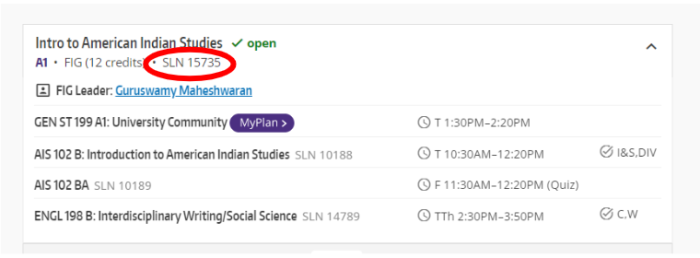
- You can utilize MyPlan first, or go right to Register.UW (skip to the next bullet point)
- To use MyPlan: On the FIG Search page, click the purple "MyPlan" button next to the GEN ST 199 in the FIG you would like to join
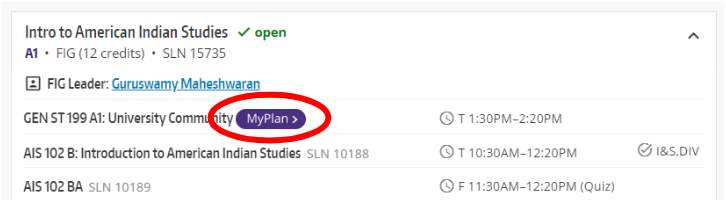
- Add the GEN ST 199 section to your registration
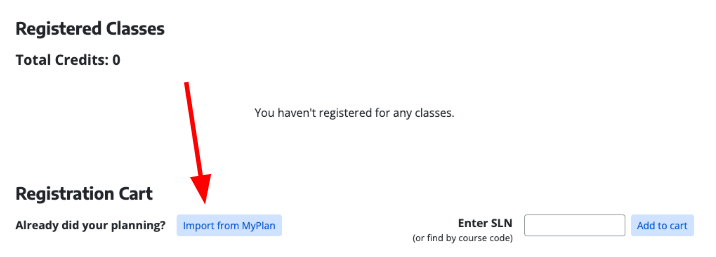
- In Register.UW, select 'Import from MyPlan'
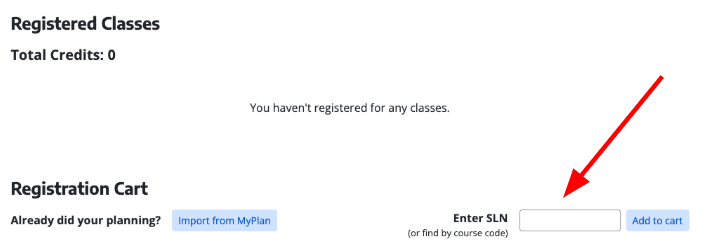
- In Register.UW: enter the one SLN of the GEN ST 199 in the 'Enter SLN' box
- Select 'Update Schedule'
- Please note: You will only see the GEN ST 199 section in your Registration Cart, but once you hit "Update Schedule" you will be enrolled in all the courses in the FIG, which can be seen on the FIG Search website: nstp.uw.edu/figsearch
To drop a FIG
- In Register.UW, drop the GEN ST 199 course only. This will automatically drop all the classes linked in the FIG
- If you try to drop FIG courses individually, it will ask you for a drop code
- There are no drop codes for FIGs, you will have to drop the FIG by dropping only the GEN ST 199 course
- Reminder: FIGs come as a package deal! If you drop a FIG you will drop all classes within that FIG


